This system uses an LED strip with 80 WS2812B chips. One LED chip lights up every 0.5°C, and the temperature ranges from -5°C to +34.5°C. Each chip contains one red, one green, and one blue LED. PIC16F1827 and PIC12F1840 microcontrollers are used for control. The software includes source .asm and .hex code, as well as PCB, panel, and box designs prepared with Eagle CAD software.
All colors can be mixed by adjusting the brightness using potentiometers. The WS2812B LED strip is controlled via software using pulses. The strip is mounted vertically on a board.
The WS2812B LED strip, cut from a roll, has 80 chips and a total length of approximately 1.30 meters. When all LEDs are lit, it draws approximately 3 amps on 5V; the recommended power supply is 5V 5A. Additionally, a 4700uf capacitor is added at the bottom of the WS2812B LED strip to support the voltage between the 5V and negative terminals.
WS2812B Thermometer Operation
Contents
The temperature is readable by the number of illuminated LEDs. A Celsius scale is located on the left and right of the vertical LED strip. (A printed template is included). It measures the temperature every 30 seconds and displays it by illuminating the LEDs in 0.5°C increments.
It ranges from -5.0°C at the bottom to +34.5°C at the top. The last illuminated LED, showing the current (actual) temperature, blinks every 0.5 seconds. Designed for outdoor use. If the temperature exceeds +34.0°C, the entire LED bar blinks red.
If the temperature drops below -4.5°C, the entire LED bar blinks blue. When the temperature returns to the normal range, the illuminated temperature bar reappears, depending on the temperature.
After an adjustable time (set in the program), the illuminated LED temperature bar turns off. Then, it blinks from one LED to another until the current temperature is reached.

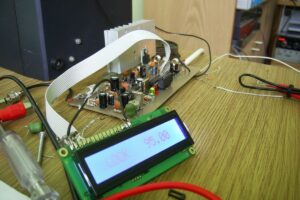
The start-up time, determined by the number of illuminated LEDs (or temperature), is approximately 1.5 seconds. The control unit is located on top of the board in a water-resistant housing with a plexiglass cover. Behind the transparent cover, the temperature can be read directly on the 1×8 character LCD screen.
Here, the temperature is displayed in 0.5°C increments (14.5°C / 15.0°C / 15.5°C…). This is exactly as shown on the temperature LED bar. Beyond +34.0°C and -4.5°C, the temperature bar is not displayed (it flashes blue/red), but the temperature continues to be displayed on the screen in the range of -55°C to +125°C. A DS18B20 temperature sensor with +/- 0.5°C accuracy is used.
This sensor actually provides 0.1°C increments. However, it has been reprogrammed in the PIC16F1827 program to provide only 0.5°C increments. The DS18S20 sensor, which operates in 0.5°C increments, can also be used.
Different software is used for this sensor. The maximum length of the specially manufactured sensor cable is 5 meters.
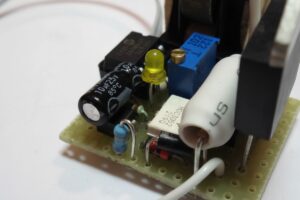
The plexiglass housing above, next to the screen, contains the following:

WS2812B PIC16F1827 PIC12F1840 Thermometer Modes
3 potentiometers to adjust/mix the colors of the LED bar (green, red, blue) in Mode 1 and Mode 2
1 potentiometer to adjust the intensity of the blue color at negative temperatures in Mode 2
1 push button to activate color adjustment for Modes 1 and 2
1 indicator LED to confirm push button press in Modes 1 and 2
In “Mode 1”, press and hold the push button for 1 second until “Mode 1” appears and the red indicator LED lights up.
When the push button is released, the entire LED temperature bar will be displayed in a single color according to the selected color. All mixed colors of the temperature bar can be adjusted using the 3 potentiometers (green, red, blue).
Since the entire LED strip lights up along with all LED chips, check if any LED is faulty. You can see it.
Pressing the button again for 1 second turns off the red indicator LED and the “Mode 1” message disappears. After that, you are in temperature display mode 1, where the LED temperature bar only lights up in the selected color. The color potentiometers are now disabled.
To set “Mode 2”, press and hold the button for 5 seconds. First (after 1 second), the “Mode 1” message appears and the red LED lights up. If you hold it down longer (4 seconds), “Mode 2” appears on the screen and a green LED lights up next to the red LED. For a dual-color LED, it will appear yellow. Then, for positive temperatures, all LED chips light up in a single color.
The color can be adjusted using three potentiometers, as in Mode 1, but for positive temperature LED chips. Negative temperature LED chips light up blue, and brightness/intensity can be adjusted with an additional potentiometer.
Pressing the button for one second turns off the green and red indicator LEDs and the “Mode 2” label disappears. Now, in the selected temperature display mode 2, the positive temperature chip LED bar illuminates in the selected color, and negative temperatures appear blue as previously configured. The color potentiometers are now disabled.
To set “Mode 3,” press and hold the button for nine seconds.
After the “Mode 2” label appears, continue holding the button for another four seconds. Then release the button.
Here, the “blue” glow of the negative temperature remains. The temperatures are kept constant as in “Mode 2.”
And the light intensity can be continuously adjusted using the standard additional potentiometer. The positive color bar starts green at the bottom and gradually turns red. It can be adjusted to four brightness levels using the potentiometer. The potentiometer acts like a four-position switch.
Pressing the button for another second turns off the indicator LEDs, and the “Mode 3” label disappears. Then, the temperature bar, varying according to the temperature, appears.
The color potentiometers are now disabled. The selected color and mode number are saved to the controller’s EEPROM.
When the device is switched on again, for example with a timer, the same color and mode will appear. While in temperature display mode, a scrolling text message “Temperature Measurement” will appear after an adjustable time interval. The repetition interval can be set in the ASM program.
PIC16F1827 PIC12F1840 WS2812B Thermometer Circuit Diagram

Source dl3ukh.de/Bastel-LED-Temperatur-Lineal.htm