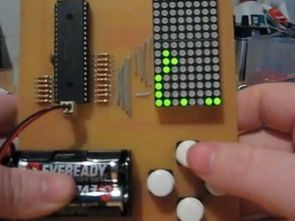
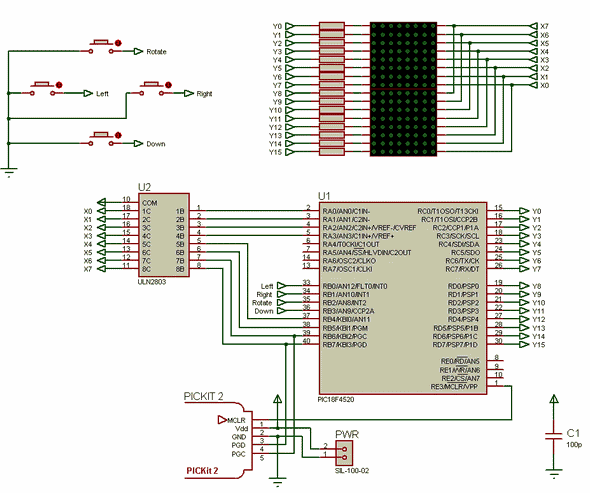
A tetris game circuit to play Tetris costly software and hardware part of the business, but may be useful for the persons concerned could limp PIC18F4520 microcontroller circuit board on the transform matrix to create a chart on display, xy coordinates, pixel calculations, etc.. described in detail ..
The PIC Tetris game (PICtris) spawned from a recent question by RetroBrad in the forum. He wanted to know how to manipulate LEDs and draw 2D graphics. I’m more of a practical kind of guy and in the past, graphics were never an area of concern. I was intrigued to delve into the world of 2D to find out how things tick.
The 64 LEDs and four buttons are controlled by a single PIC (18LF4520) and two AA batteries. The source code operates very efficiently, and the program is extremely responsive. I was worried about the latter as I was determined to use algorithm based graphic rotations as compared to predefined constants. From here I could use a similar approach to create other interactive games!
NOTE: Tetris was developed for Swordfish Basic; the source code will compile under the free Swordfish Special Edition version.
Before I press on, here is a video of the completed Tetris game
As always, new features are a must! Since the above video, I have added the following:
A splash screen that displays “TETRIS” when the game starts.
High scores – your efforts are recorded in the EEPROM.
High power darlington driver to brighten up the display.All of the above features are incorporated in the source code (found below). Also, here is a recently completed version of the game – with audio! (Big thanks to DomS from Digital DIY for this project video) Enrico Castellani also made a version of the PICTris board, and has been kind enough to share the Eagle PCB layout files. You can find the files and a video demonstration in the comments below.
Creating 2D Graphics In the Tetris game, graphics are treated as 8×16 pixel objects. To ease the overhead of graphic design, I made an Excel spreadsheet that does all of the hard work for you.
There’s an 8×16 field where you can place an “x” for each block of the object. Any block with a “x” will be formatted to look as it does below (I found that approach easier to interpret compared to scattered x’s). The spreadsheet will calculate and display the Swordfish code required for the graphic! Simple. Here’s a screen shot:
Create & Display Text The spreadsheet can be used to create any object, including text. I recently wanted to add a small feature – a splash-screen. Using the graphic designer made it extremely easy to do. I put an “x” in all the spots that would make up the word TETRIS on the 8×16 display. I had to get a little creative and split the word into two columns as shown on the right. If you’d like to look at how I used the object as a text – browse through the source code (listed below), there will be a routine there called “SplashScreen”.
Graphics on a PIC There are several avenues to take when working with 2D graphics. I explored the mathematics behind two approaches: trigonometry (rotating Cartesian coordinates) and 2D affine matrix transformation. Both of them sound like you need a university degree to understand, though they are really quite simple in application. I originally used trigonometry to rotate the objects, though affine matrix transformation was much simpler and more importantly, faster.
Source: digital-diy.com/swordfish-project/213-tetris-on-a-pic-micro.html alternative link:

4 Channel USB Fan Control Circuit PIC18F2550 LM335Z
Fan control circuit on a Board of Directors established the computer control program through Pic18f2550 microcontroller 4 channel can be set independently of the rotation speed of the fans is connected. Temperature sensor is used as LM335Z. The program’s work for Microsoft. NET framework 3.5 must be installed already the program installation files downloading USB fan control software with Visual Basic Express 2008 installation and source files.
Very cool! parts on the way
is it possible to have the password for the .ZIP please?thx
Hello,
Download and try again. If it doesn’t work, install the latest version of winrar https://www.rarlab.com/download.htm