PIC16F877 bilgisayar kontrollü ev otomasyonu vbasic

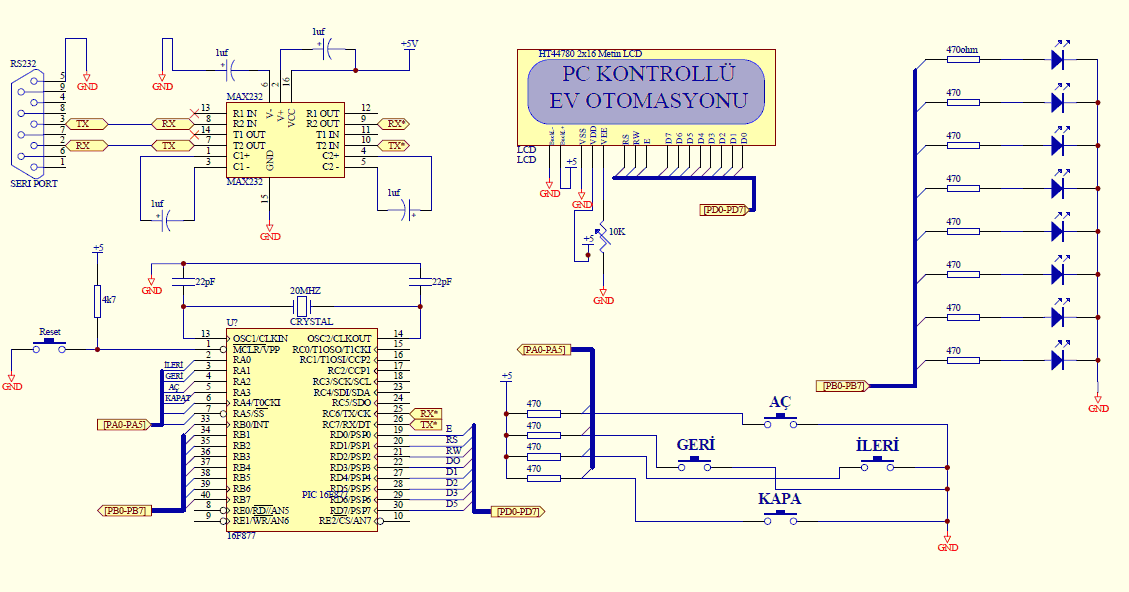
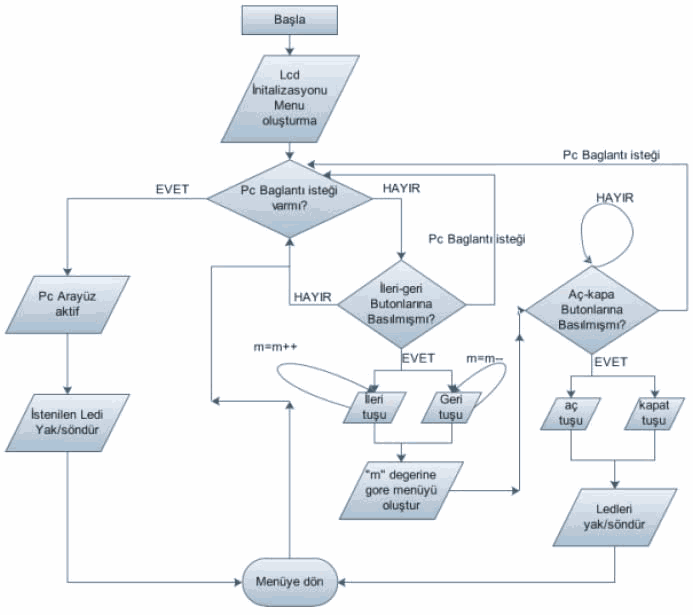
Temel ev otomasyonu projesi örnek olabilecek tüm kaynakları ile INFINITY tarafında picproje forumlarında paylaşılmış yazılım ccs-c ile hazırlanmış kaynak .c .h ccsc kodları isis simülasyon dosyası ve visual basic arayüz kontrol programının .vbp, .frm, .vbw kodları bulunuyor pic ve bilgisayar ile haberleşme max232 kullanılarak seri port üzerinden sağlanmış.
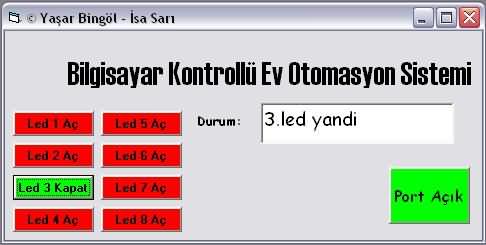
Program ile pic çıkışlarında ki ledler kumanda eliyor led durumları görülebiliyor çıkışlar güçlendirilerek farklı elemanlar (röle,triyak,tristör vb.) kontrol edilebilir lcd üzerinde çalışma bilgileri görüntüleniyor.
Hazırlayanlar: Yaşar BİNGÖL İsa SARI
VISUAL BASIC KODLARI
VERSION 5.00
Object = "{648A5603-2C6E-101B-82B6-000000000014}#1.1#0"; "MSCOMM32.OCX"
Begin VB.Form Form1
Caption = "© Yaşar Bingöl - İsa Sarı"
ClientHeight = 3240
ClientLeft = 60
ClientTop = 450
ClientWidth = 7155
DrawStyle = 5 'Transparent
LinkTopic = "Form1"
ScaleHeight = 3240
ScaleWidth = 7155
StartUpPosition = 3 'Windows Default
Begin VB.CommandButton Command10
BackColor = &H000000FF&
Caption = "PORT Aç/Kapa"
BeginProperty Font
Name = "Comic Sans MS"
Size = 12
Charset = 162
Weight = 400
Underline = 0 'False
Italic = 0 'False
Strikethrough = 0 'False
EndProperty
Height = 855
Left = 5760
Style = 1 'Graphical
TabIndex = 11
Top = 2040
Width = 1215
End
Begin VB.CommandButton Command7
BackColor = &H000000FF&
Caption = "Led 7 Aç"
Enabled = 0 'False
BeginProperty Font
Name = "MS Sans Serif"
Size = 8.25
Charset = 162
Weight = 700
Underline = 0 'False
Italic = 0 'False
Strikethrough = 0 'False
EndProperty
Height = 375
Left = 1440
Style = 1 'Graphical
TabIndex = 9
Top = 2160
Width = 1215
End
Begin VB.CommandButton Command8
BackColor = &H000000FF&
Caption = "Led 8 Aç"
Enabled = 0 'False
BeginProperty Font
Name = "MS Sans Serif"
Size = 8.25
Charset = 162
Weight = 700
Underline = 0 'False
Italic = 0 'False
Strikethrough = 0 'False
EndProperty
Height = 375
Left = 1440
Style = 1 'Graphical
TabIndex = 8
Top = 2640
Width = 1215
End
Begin VB.CommandButton Command6
BackColor = &H000000FF&
Caption = "Led 6 Aç"
Enabled = 0 'False
BeginProperty Font
Name = "MS Sans Serif"
Size = 8.25
Charset = 162
Weight = 700
Underline = 0 'False
Italic = 0 'False
Strikethrough = 0 'False
EndProperty
Height = 375
Left = 1440
Style = 1 'Graphical
TabIndex = 7
Top = 1680
Width = 1215
End
Begin VB.CommandButton Command4
BackColor = &H000000FF&
Caption = "Led 4 Aç"
Enabled = 0 'False
BeginProperty Font
Name = "MS Sans Serif"
Size = 8.25
Charset = 162
Weight = 700
Underline = 0 'False
Italic = 0 'False
Strikethrough = 0 'False
EndProperty
Height = 375
Left = 120
Style = 1 'Graphical
TabIndex = 6
Top = 2640
Width = 1215
End
Begin VB.CommandButton Command2
BackColor = &H000000FF&
Caption = "Led 2 Aç"
Enabled = 0 'False
BeginProperty Font
Name = "MS Sans Serif"
Size = 8.25
Charset = 162
Weight = 700
Underline = 0 'False
Italic = 0 'False
Strikethrough = 0 'False
EndProperty
Height = 375
Left = 120
Style = 1 'Graphical
TabIndex = 5
Top = 1680
Width = 1215
End
Begin VB.TextBox Text1
BeginProperty Font
Name = "Comic Sans MS"
Size = 14.25
Charset = 162
Weight = 400
Underline = 0 'False
Italic = 0 'False
Strikethrough = 0 'False
EndProperty
Height = 615
Left = 3840
Locked = -1 'True
TabIndex = 4
Top = 1080
Width = 2895
End
Begin VB.CommandButton Command5
BackColor = &H000000FF&
Caption = "Led 5 Aç"
Enabled = 0 'False
BeginProperty Font
Name = "MS Sans Serif"
Size = 8.25
Charset = 162
Weight = 700
Underline = 0 'False
Italic = 0 'False
Strikethrough = 0 'False
EndProperty
Height = 375
Left = 1440
Style = 1 'Graphical
TabIndex = 3
Top = 1200
Width = 1215
End
Begin VB.CommandButton Command3
BackColor = &H000000FF&
Caption = "Led 3 Aç"
Enabled = 0 'False
BeginProperty Font
Name = "MS Sans Serif"
Size = 8.25
Charset = 162
Weight = 700
Underline = 0 'False
Italic = 0 'False
Strikethrough = 0 'False
EndProperty
Height = 375
Left = 120
Style = 1 'Graphical
TabIndex = 2
Top = 2160
Width = 1215
End
Begin VB.CommandButton Command1
BackColor = &H000000FF&
Caption = "Led 1 Aç"
Enabled = 0 'False
BeginProperty Font
Name = "MS Sans Serif"
Size = 8.25
Charset = 162
Weight = 700
Underline = 0 'False
Italic = 0 'False
Strikethrough = 0 'False
EndProperty
Height = 375
Left = 120
Style = 1 'Graphical
TabIndex = 1
Top = 1200
Width = 1215
End
Begin MSCommLib.MSComm MSComm1
Left = 240
Top = 0
_ExtentX = 1005
_ExtentY = 1005
_Version = 393216
DTREnable = -1 'True
End
Begin VB.Label Label2
Caption = "Durum:"
BeginProperty Font
Name = "Comic Sans MS"
Size = 9.75
Charset = 162
Weight = 700
Underline = 0 'False
Italic = 0 'False
Strikethrough = 0 'False
EndProperty
Height = 375
Left = 2880
TabIndex = 10
Top = 1200
Width = 735
End
Begin VB.Label Label1
Caption = " Bilgisayar Kontrollü Ev Otomasyon Sistemi"
BeginProperty Font
Name = "Haettenschweiler"
Size = 24
Charset = 162
Weight = 500
Underline = 0 'False
Italic = 0 'False
Strikethrough = 0 'False
EndProperty
Height = 495
Left = 720
TabIndex = 0
Top = 360
Width = 6855
End
End
Attribute VB_Name = "Form1"
Attribute VB_GlobalNameSpace = False
Attribute VB_Creatable = False
Attribute VB_PredeclaredId = True
Attribute VB_Exposed = False
Dim b, c, d, e, f, g, h, i, j As Integer
Dim deger As Integer
Dim data As String
Dim a As Integer
Private Sub Command1_Click()
Text1.Text = "1.led yandi"
If b = 0 Then
MSComm1.Output = "1"
Command1.Caption = "Led 1 Kapat"
Command1.BackColor = vbGreen
b = 1
Else
Command1.Caption = "Led 1 Aç"
Command1.BackColor = vbRed
Text1.Text = "1.led söndü"
MSComm1.Output = "2"
b = 0
End If
End Sub
Private Sub Command10_Click()
Command1.Enabled = True
Command2.Enabled = True
Command3.Enabled = True
Command4.Enabled = True
Command5.Enabled = True
Command6.Enabled = True
Command7.Enabled = True
Command8.Enabled = True
Text1.Text = "Port Açıldı"
If j = 0 Then
Command10.Caption = "Port Açık"
Command10.BackColor = vbGreen
MSComm1.PortOpen = True
MSComm1.Settings = "9600,N,8,1"
MSComm1.Output = "A"
j = 1
Else
Command10.Caption = "Port Kapalı"
Command10.BackColor = vbRed
Text1.Text = "Port Kapandı"
MSComm1.Output = "B"
MSComm1.PortOpen = False
j = 0
End If
End Sub
Private Sub Command2_Click()
Text1.Text = "2.led yandi"
If c = 0 Then
Command2.Caption = "Led 2 Kapat"
Command2.BackColor = vbGreen
MSComm1.Output = "3"
c = 1
Else
Command2.Caption = "Led 2 Aç"
Command2.BackColor = vbRed
Text1.Text = "2.led söndü"
MSComm1.Output = "4"
c = 0
End If
End Sub
Private Sub Command3_Click()
Text1.Text = "3.led yandi"
If d = 0 Then
Command3.Caption = "Led 3 Kapat"
Command3.BackColor = vbGreen
MSComm1.Output = "5"
d = 1
Else
Command3.Caption = "Led 3 Aç"
Command3.BackColor = vbRed
Text1.Text = "3.led söndü"
MSComm1.Output = "6"
d = 0
End If
End Sub
Private Sub Command4_Click()
Text1.Text = "4.led yandi"
If e = 0 Then
Command4.Caption = "Led 4 Kapat"
Command4.BackColor = vbGreen
MSComm1.Output = "7"
e = 1
Else
Command4.Caption = "Led 4 Aç"
Command4.BackColor = vbRed
Text1.Text = "4.led söndü"
MSComm1.Output = "8"
e = 0
End If
End Sub
Private Sub Command5_Click()
Text1.Text = "5.led yandi"
If f = 0 Then
Command5.Caption = "Led 5 Kapat"
Command5.BackColor = vbGreen
MSComm1.Output = "j"
f = 1
Else
Command5.Caption = "Led 5 Aç"
Command5.BackColor = vbRed
Text1.Text = "5.led söndü"
MSComm1.Output = "k"
f = 0
End If
End Sub
Private Sub Command6_Click()
Text1.Text = "6.led yandi"
If g = 0 Then
Command6.Caption = "Led 6 Kapat"
Command6.BackColor = vbGreen
MSComm1.Output = "l"
g = 1
Else
Command6.Caption = "Led 6 Aç"
Command6.BackColor = vbRed
Text1.Text = "6.led söndü"
MSComm1.Output = "m"
g = 0
End If
End Sub
Private Sub Command7_Click()
Text1.Text = "7.led yandi"
If h = 0 Then
Command7.Caption = "Led 7 Kapat"
Command7.BackColor = vbGreen
MSComm1.Output = "n"
h = 1
Else
Command7.Caption = "Led 7 Aç"
Command7.BackColor = vbRed
Text1.Text = "7.led söndü"
MSComm1.Output = "o"
h = 0
End If
End Sub
Private Sub Command8_Click()
If i = 0 Then
Command8.Caption = "Led 8 Kapat"
Text1.Text = "8.led yandi"
Command8.BackColor = vbGreen
MSComm1.Output = "p"
i = 1
Else
Command8.Caption = "Led 8 Aç"
Command8.BackColor = vbRed
Text1.Text = "8.led söndü"
MSComm1.Output = "q"
i = 0
End If
End Sub
Private Sub Frame1_DragDrop(Source As Control, X As Single, Y As Single)
End Sub
Private Sub Label3_Click()
End Sub
CCS PROGRAMINDA YAZILMIŞ C KODLARI
#include "C:Documents and SettingsASUSDesktop16F8771PROJESON.h"
#use rs232(baud=9600, xmit=PIN_c6, rcv=PIN_c7, UART1)
#include <lcd.c>
#include <prog1.h>
#include <prog2.h>
#include <prog3.h>
int a,b,c,d;
void main()
{
asd:
lcd_init();
basla:
delay_ms(200);
lcd_gotoxy(1,1);
printf(lcd_putc," <<MENU>> ");
lcd_gotoxy(1,2);
printf(lcd_putc,"<<geri ");
lcd_gotoxy(10,2);
printf(lcd_putc,"ileri>>");
for(;;)
{
a=input(pin_A0); //Butonlar Tanımlandı-Sağ
b=input(pin_A1); //Sol
c=input(pin_A2); //Ac
d=input(pin_A3); //Kapa
//Seri portta veri varmi kontrol ediliyor
if(kbhit())
{
g = getc();
}
if(g=='A')
{
lcd_init();
lcd_gotoxy(1,1);
printf(lcd_putc,"PC BAGLANTISI");
Delay_ms(20);
lcd_gotoxy(5,2);
printf(lcd_putc,"HAZIR");
for(;;)
{
a=input(pin_A0); //Butonlar Tanımlandı-Sağ
b=input(pin_A1); //Sol
c=input(pin_A2); //Ac
d=input(pin_A3); //Kapa
if(kbhit())
{
g = getc();
}
if(g=='B')
{
lcd_gotoxy(1,1);
printf(lcd_putc,"PC BAGLANTISI ");
Delay_ms(20);
lcd_gotoxy(1,2);
printf(lcd_putc," KESILDI ");
delay_ms(2000);
goto asd;
}
pccon();
if(a==0||b==0||c==0||d==0)
{
break;
}
}
}
if (a==0)
{
m=m+1;
if(m>8)
{
m=8;
}
menua();
}
if (b==0)
{
m=m-1;
if(m<1)
{
m=1;
}
menub();
}
if(k==1)
{
if(c==0)
{
lcd_gotoxy(1,2);
printf(lcd_putc,"< Led1 Acildi >");
output_bit( PIN_B0, 1);
delay_ms(2000);
k=0;
m=0;
goto basla;
}
if(d==0)
{
lcd_gotoxy(1,2);
printf(lcd_putc,"<Led1 Kapatildi>");
output_bit( PIN_B0, 0);
delay_ms(2000);
k=0;
goto basla;
}
}
if(k==2)
{
if(c==0)
{
lcd_gotoxy(1,2);
printf(lcd_putc,"< Led2 Acildi >");
output_bit( PIN_B1, 1);
delay_ms(2000);
k=0;
m=0;
goto basla;
}
if(d==0)
{
lcd_gotoxy(1,2);
printf(lcd_putc,"<Led2 Kapatildi>");
output_bit( PIN_B1, 0);
delay_ms(2000);
k=0;
goto basla;
}
}
if(k==3)
{
if(c==0)
{
lcd_gotoxy(1,2);
printf(lcd_putc,"< Led3 Acildi >");
output_bit( PIN_B2, 1);
delay_ms(2000);
k=0;
m=0;
goto basla;
}
if(d==0)
{
lcd_gotoxy(1,2);
printf(lcd_putc,"<Led3 Kapatildi>");
output_bit( PIN_B2, 0);
delay_ms(2000);
k=0;
goto basla;
}
}
if(k==4)
{
if(c==0)
{
lcd_gotoxy(1,2);
printf(lcd_putc,"< Led4 Acildi >");
output_bit( PIN_B3, 1);
delay_ms(2000);
k=0;
m=0;
goto basla;
}
if(d==0)
{
lcd_gotoxy(1,2);
printf(lcd_putc,"<Led4 Kapatildi>");
output_bit( PIN_B3, 0);
delay_ms(2000);
k=0;
goto basla;
}
}
if(k==5)
{
if(c==0)
{
lcd_gotoxy(1,2);
printf(lcd_putc,"< Led5 Acildi >");
output_bit( PIN_B4, 1);
delay_ms(2000);
k=0;
m=0;
goto basla;
}
if(d==0)
{
lcd_gotoxy(1,2);
printf(lcd_putc,"<Led5 Kapatildi>");
output_bit( PIN_B4, 0);
delay_ms(2000);
k=0;
goto basla;
}
}
if(k==6)
{
if(c==0)
{
lcd_gotoxy(1,2);
printf(lcd_putc,"< Led6 Acildi >");
output_bit( PIN_B5, 1);
delay_ms(2000);
k=0;
m=0;
goto basla;
}
if(d==0)
{
lcd_gotoxy(1,2);
printf(lcd_putc,"<Led6 Kapatildi>");
output_bit( PIN_B5, 0);
delay_ms(2000);
k=0;
goto basla;
}
}
if(k==7)
{
if(c==0)
{
lcd_gotoxy(1,2);
printf(lcd_putc,"< Led7 Acildi >");
output_bit( PIN_B6, 1);
delay_ms(2000);
k=0;
m=0;
goto basla;
}
if(d==0)
{
lcd_gotoxy(1,2);
printf(lcd_putc,"<Led7 Kapatildi>");
output_bit( PIN_B6, 0);
delay_ms(2000);
k=0;
goto basla;
}
}
if(k==8)
{
if(c==0)
{
lcd_gotoxy(1,2);
printf(lcd_putc,"< Led8 Acildi >");
output_bit( PIN_B7, 1);
delay_ms(2000);
k=0;
m=0;
goto basla;
}
if(d==0)
{
lcd_gotoxy(1,2);
printf(lcd_putc,"<Led8 Kapatildi>");
output_bit( PIN_B7, 0);
delay_ms(2000);
k=0;
goto basla;
}
}
setup_adc_ports(NO_ANALOGS);
setup_adc(ADC_OFF);
setup_psp(PSP_DISABLED);
setup_spi(FALSE);
setup_timer_0(RTCC_INTERNAL|RTCC_DIV_1);
setup_timer_1(T1_DISABLED);
setup_timer_2(T2_DISABLED,0,1);
}
}
Kaynak sayfa burada
tüm dosyalar için alternatif link pic16f877-bilgisayar-kontrollu-ev-otomasyonu-vbasic.rar
Yazar: gevv
Yazarımızın 320volt.com Blog üzerinde şu an okuduğunuz yazı dahil 1959 yazısı bulunmaktadır. Yazarımız hakkında bilgileri ve diğer yazılarını görmek için bakınız; gevv


arkadaşım paylaşım için teşekkürler. ben hobi olarak bu tarz devreler yapmak istiyorum. Çok fazla elektronik bilgim yok. bu tarz ev otomasyon devreleri inceledim fakat 20 – 30 kadar yada daha fazla cihazı nasıl kontrol edeceğimi hala çözemedim. bu devrede ile 8 led kontrol edilmiş ve durumları döndüğrülmüş. Bu devreden nasıl daha fazla led (yada cihaz) kontrol edebilirim. Bu istediğime göre bir devre önerebilirmisin ?
c # ile de yapabilir miyiz bu devreyi
evet yazabilirsiniz c# ile
Kardeş bende amatör olarak bu işlerle uğraşıyorum senin 20-30 tane cihazı kontrol edebilmen için ilk önce portlardan çıkan yaklaşık 5 voltluk enerjiyi bir ara devre ile 12 volta yükseltmelisin daha sonra bu devre ile röleyi tetikleyip istediğin cihazı çalıştırabilirsin :)
ya burdaki printf,#include komutları mikroc pro da işe yararmı yani kullanabilirmiyim aynı şekilde? bu;
printf(lcd_putc,”HAZIR”); – if(kbhit()) – g = getc(); – if(g==’A') – if(g==’B')
goto asd;
pccon();
break;
menua();
output_bit( PIN_B4, 1);
goto basla;
setup_adc_ports(NO_ANALOGS);
setup_adc(ADC_OFF);
setup_psp(PSP_DISABLED);
setup_spi(FALSE);
setup_timer_0(RTCC_INTERNAL|RTCC_DIV_1);
setup_timer_1(T1_DISABLED);
setup_timer_2(T2_DISABLED,0,1);
bu komutların anlamlarını karşılarına yazarmısınız ne demek yani mikro c pro ya çeviricemde programı. burdaki tüm komutları bilmem gerekiyor,ne iş yaptığını.